

What is BYOB?
BYOB stands for "Build Your Own Buzz," and it represents a different way of building websites. Instead of the traditional approach—where you either learn HTML/CSS or drag elements around in a visual builder—you simply describe what you want in plain English, and the AI builds it for you.
I've watched people who have never written a line of code in their lives build complete, professional-looking websites in under an hour. The learning curve isn't weeks or months; it's about 15 minutes of experimenting with prompts. That's the core promise: you focus on what you want, and BYOB figures out how to build it.
Whether you're a complete beginner trying to get a portfolio online or an experienced developer who just wants to skip the boilerplate, the experience is the same: you type, the AI builds, and you refine until it's right.
No coding experience is required. If you can describe what you want in a sentence or two, you can build a website.
Understanding the Interface
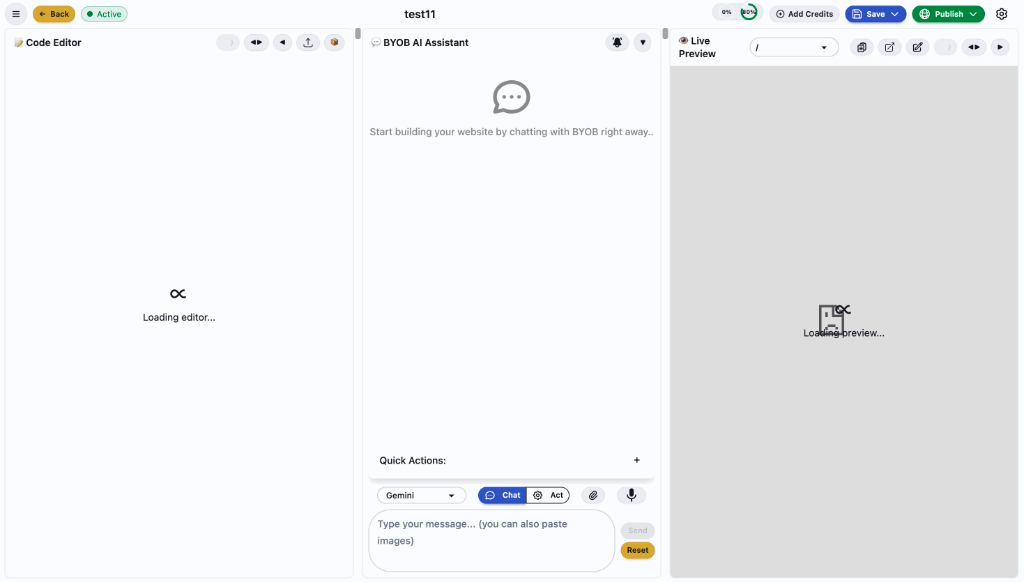
When you open BYOB for the first time, you'll see a three-panel layout. It might look intimidating if you're used to simpler tools, but each panel has a clear purpose, and you'll spend most of your time in just one of them.
The AI Assistant Panel Explained
The AI Assistant is where you'll spend most of your time, so it's worth understanding how it works. At the top, you'll see a model selector that lets you choose between different AI models—Gemini, GPT, and others. Different models have different strengths; you might find that one handles complex layouts better while another is faster for simple changes.
Below that is a toggle between "Chat Mode" and "Act Mode." This distinction matters. In Chat Mode, you can ask the AI questions about your project, about web development in general, or about how to approach a particular design problem. The AI will respond with explanations and suggestions, but it won't change anything in your project.
In Act Mode, your messages become instructions. When you type "Add a contact form at the bottom of the page," the AI doesn't just tell you how—it actually writes the code and updates your site. This is where the building happens.
Creating Your First Project
Starting a new project takes about thirty seconds. From the dashboard, you click "New Project," give it a name (something descriptive like "Coffee Shop Site" or "Portfolio v2"), and you're dropped into the editor with a blank canvas.
The blank canvas can feel paralyzing at first. Here's what I recommend: start with a clear, specific first request. Don't just say "build me a website"—that's too vague for any designer, human or AI. Instead, try something like:
Create a modern landing page for a coffee shop called "Bean & Brew".
I want a warm color palette with earth tones, a hero section with a
full-bleed background image, a menu section showing our signature drinks,
and a contact form at the bottom with our location map.
Within a minute, you'll have a complete first draft. Is it perfect? Probably not—but now you have something to react to. You can say "make the hero section taller" or "change the font to something more playful" or "the menu prices should be in a grid, not a list." Each refinement takes seconds.
This iterative approach is the key to working effectively with BYOB. Don't try to describe everything perfectly upfront. Get something on the screen, see how it looks, and refine from there. It's faster and you'll end up with a better result because you're making decisions with something visual in front of you rather than trying to imagine everything in your head.
Watch: Adding Credits to Your Account
See how easy it is to add credits to your account
How Credits Work
BYOB uses a credit system to manage AI usage, and it's worth understanding how credits are consumed so you can work efficiently.
The basic principle is that credits are used when the AI generates or modifies code. Viewing your project, browsing your files, or even asking questions in Chat Mode uses minimal credits. The heavy lifting—having the AI write new components, refactor your layout, or add new functionality—is where credits get spent.
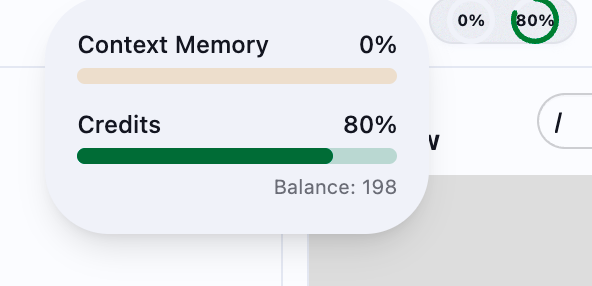
You'll see two indicators in the top navigation bar. The first is your credit balance, which shows how many credits you have remaining. The second is "Context Memory," which shows how much of the AI's working memory is being used for your current session. As you chat more and your project grows more complex, the context memory fills up. When it gets too high, you might notice the AI forgetting earlier parts of your conversation or making inconsistent choices. At that point, it can help to start a fresh session.
Complex requests that involve generating multiple components or restructuring large parts of your site use more credits than simple tweaks. Being specific in your requests helps the AI work more efficiently.
Saving Your Work
BYOB has a built-in version control system that works similarly to how professional developers track changes in their code. Every time you save, you create a snapshot of your project that you can return to later if needed.
Watch: Saving Your Project Changes
Save your work with descriptive commit messages
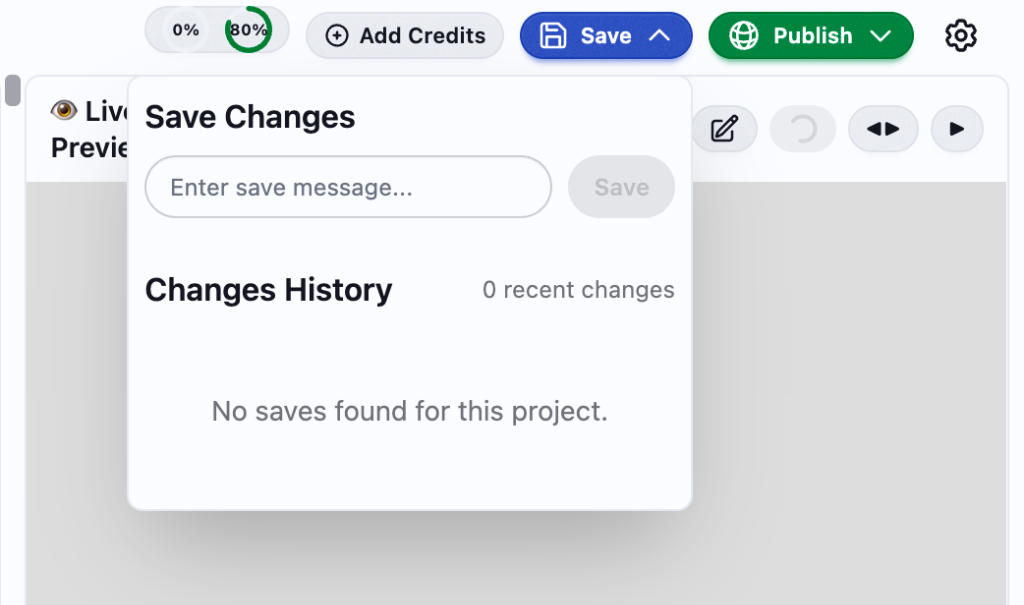
To save, click the green Save button in the top navigation. You'll be prompted to enter a message describing what changed—something like "Added contact form" or "Fixed mobile navigation." These messages aren't just for show; they create a history of your project's evolution. If you ever need to roll back to an earlier version—maybe you made a series of changes that looked good individually but broke the overall design—you can browse through your save history and restore any previous state with one click.
I recommend saving frequently, especially before making big changes. About to restructure your entire layout? Save first. That way, if the restructure doesn't work out, you're one click away from where you started.
BYOB does auto-save periodically, so you won't lose work if you forget to save manually. But explicit saves with descriptive messages make it much easier to navigate your project's history later.
Think of save messages like leaving notes for your future self. "Fixed stuff" is useless three weeks later; "Moved testimonials above pricing section" tells you exactly what that version contains.
Publishing Your Website
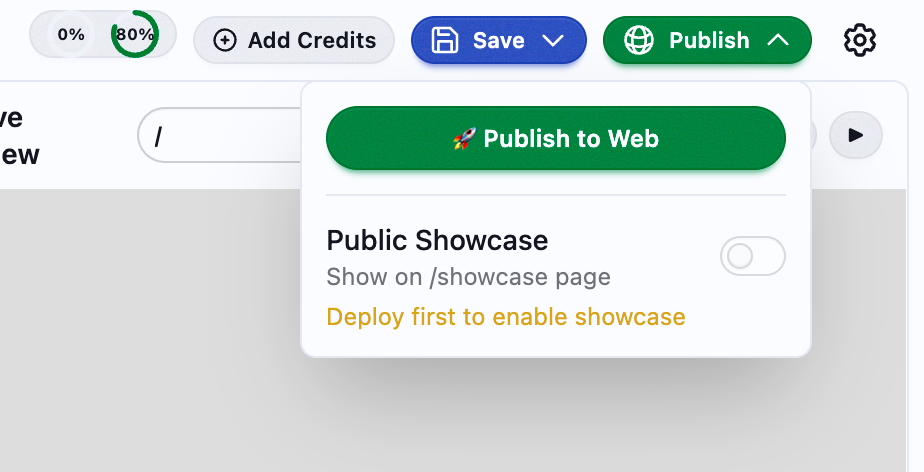
Once your site looks the way you want it, publishing takes just a few seconds. Click the Publish button in the top navigation, select "Publish to Web," and BYOB handles the rest—building the production version of your site, optimizing assets, and deploying everything to a global CDN.
Watch: Publishing Your Website Live
Deploy your website to the world in seconds
When the deployment finishes, you get a URL that you can share immediately. The site is live, served from edge nodes around the world, with SSL already configured. There's no server to manage, no hosting to set up, no DNS records to configure manually.
You also have the option to enable "Public Showcase," which features your site on BYOB's showcase page where other users can see examples of what's possible with the platform. You need to deploy at least once before enabling this, and it's entirely optional.
Your published site updates every time you deploy. Make changes in the editor, test them in the preview, and when you're happy, publish again. The URL stays the same; the content updates.
Getting Better Results from the AI
After working with BYOB for a while, you'll notice that some prompts work better than others. The AI is smart, but it's not psychic—it can only work with the information you give it. Here are some patterns that lead to better results.
Be specific about what you want. Instead of saying "make it look better," try "change the header background to a blue gradient, increase the font size to 24px, and add a subtle drop shadow." The first instruction forces the AI to guess what "better" means to you. The second tells it exactly what to do. Describe the end result, not the implementation. You don't need to say "create a flexbox container with justify-content: space-between." Just say "arrange these three cards in a row with equal spacing." Let the AI figure out the CSS. Use comparisons when they help. If you want a particular aesthetic, it's fine to reference something the AI might know: "I want the hero section to feel like the Apple homepage—minimal, lots of white space, big typography." This gives the AI a visual reference to work from. Break complex requests into steps. If you want to build a complete e-commerce site, don't ask for everything at once. Start with the homepage, then add the product grid, then create the product detail page, then build the cart. Each step gives you a chance to refine before moving on.Here are some example prompts for common tasks:
| What You Want | What to Say |
|---|---|
| A new page | "Create an About Us page that tells the story of how our company started, with a timeline of key milestones and a team section with photos and bios" |
| Different colors | "Update the color scheme to use deep purple (#4A154B) as the primary color and gold (#F0B90B) as the accent, keeping the background light" |
| Interactive functionality | "Add a contact form that asks for name, email, and message. When submitted, it should show a thank-you message and clear the fields" |
| Better mobile experience | "Reorganize the homepage for mobile: stack the hero text on top of the image, make the navigation collapsible, and increase button tap targets" |
| Animations | "Add smooth scroll behavior to all anchor links, and make each section fade in as it enters the viewport" |
How BYOB Works Under the Hood
If you're curious about the technology, here's what's happening when you interact with BYOB.
When you type a request, it goes to a large language model (LLM) that has been trained to understand both natural language and web development. The model parses your intent, generates the appropriate code, and sends it back to the editor.
What makes BYOB different from just asking ChatGPT to write code is the integration layer. We use WebContainer technology to run a complete development environment in your browser—no installations, no local setup needed. The generated code is fed directly into this environment, which builds your project and renders the preview in real-time using Hot Module Replacement (HMR).
This all happens in seconds. Type a request, see the result. No waiting for deploys, no switching between tools, no copy-pasting code from a chat window into an IDE.
Troubleshooting Common Issues
Even with a polished product, you'll occasionally run into issues. Here's how to handle the most common ones.
If the preview isn't loading, start by refreshing the page. If that doesn't work, check your internet connection—BYOB needs a stable connection to run the in-browser development environment. As a last resort, try clearing your browser cache. A corrupted cache can sometimes cause the WebContainer to fail to initialize properly. If the AI isn't responding to your requests, first check your credit balance. If you're out of credits, the AI can't generate new code. If you have credits but still aren't getting responses, try switching to a different AI model—occasionally one model will have issues while others work fine. Also consider simplifying your request; extremely complex or ambiguous prompts can sometimes confuse the model. If your changes aren't saving, make sure you're logged in—saving requires authentication. Check your internet connection, as saves are synced to the cloud. If both are fine and saves still aren't working, try clicking the Save button again. Transient network issues can occasionally cause a save to fail silently.Always save before closing your browser tab. While BYOB auto-saves periodically, a manual save ensures you don't lose the last few minutes of work if you close the tab at an unlucky moment.
What You Can Build
BYOB is designed primarily for front-end web projects: landing pages, marketing sites, portfolios, and simple web applications. Here are some examples of what people are building:
Personal portfolios for designers, developers, photographers, and other creatives who want a clean way to showcase their work. Business landing pages for startups that need to validate an idea, capture emails, or pitch investors—without spending weeks on development. Restaurant and local business sites that need to display menus, hours, locations, and contact information, optimized for local search. Event pages for conferences, weddings, and launches that need a polished presence for a limited time. Simple web applications with forms, interactive elements, and basic functionality that can be built through conversation rather than code.The sites BYOB generates are real SvelteKit projects. If you outgrow the platform or want to add complex backend functionality, you can export the code and continue development in any standard development environment.
Start Building
If you've read this far, you have everything you need to get started. The best way to learn BYOB is to build something. Pick a project—your portfolio, a landing page for a side project, a site for a friend's small business—and start typing.
The first attempt won't be perfect. Neither will the tenth. But with each request, you'll get a better sense of how to communicate with the AI, what kinds of prompts produce the best results, and how to iterate toward the design you want.
The gap between having an idea and having a live website has never been smaller.
Start Building Now →