How do you set up a custom domain in BYOB step by step? #
Connecting a custom domain feels like registering a new street address with the post office. You tell the world where mail should go, you prove the address is yours, and then letters start arriving. Get one digit wrong on the form and everything sits in a warehouse. DNS works the same way, except the warehouse is invisible and the error message says "pending" for three hours.
BYOB now runs this through a guided flow inside the project page. You add the hostname, copy exact records, track verification, and reach active SSL without hopping across random docs. If you have ever lost half a day to one wrong DNS field, this flow is for you.
TLDR #
- Deploy once before adding a custom domain.
- Add one permanent routing record that points traffic to BYOB.
- Add temporary verification records for ownership and SSL.
- Recheck status after DNS propagation.
- Keep verification records until SSL is fully active.
What do you need before you start? #
Have these ready before opening the modal.
- Domain registrar access.
- DNS management permission.
- Project already deployed at least once.
- Decision on root domain or subdomain.
If one of these is missing, setup slows down immediately. The most common stall I see is someone with access to the website but not the registrar, filing a ticket and waiting two days. Get the login first.
What happens in the custom domain wizard? #
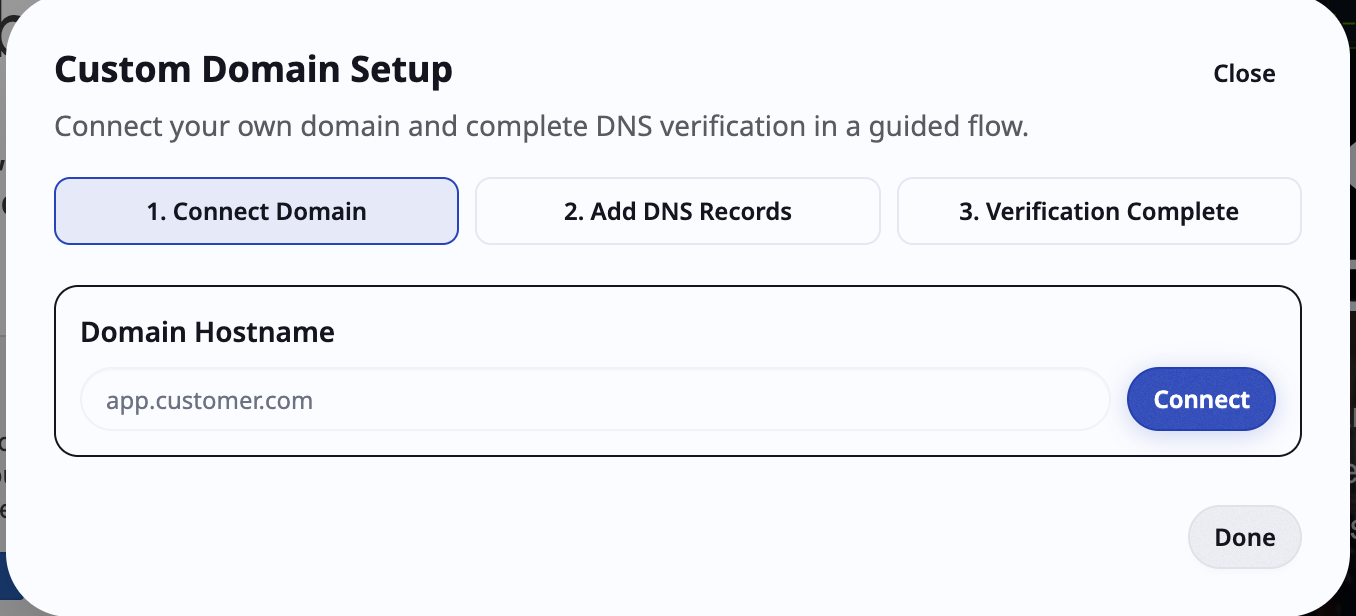
The modal separates records into two groups so teams stop confusing permanent routing with temporary validation. Routing records stay forever. Verification records exist to answer one question, "do you control this domain", and can leave once the answer is accepted.
What are the record types and their lifecycle? #
DNS itself is old, stable machinery. RFC 1035, the 1987 spec that still defines the system, describes resource records as typed entries: A records carry host addresses, CNAME records carry canonical names for aliases, TXT records carry descriptive text. Every custom domain setup is just a small arrangement of these three primitives.
| Record purpose | Typical type | Keep after setup |
|---|---|---|
| Traffic routing | CNAME or ALIAS/ANAME | Yes |
| Domain ownership | TXT | Usually no |
| SSL validation | TXT or CNAME | Keep until SSL active |
If your provider supports root flattening, BYOB still gives a target that maps cleanly to your project. Cloudflare documents this exact behavior in their DNS docs: CNAME flattening lets you place a CNAME at the apex, where the spec historically forbade one, by resolving it to addresses behind the scenes.
How does a root domain compare to a subdomain? #
Try it: Domain name ideas
Use this decision table.
| Domain choice | Good when | Typical record behavior |
|---|---|---|
example.com |
Main brand site | ALIAS/ANAME or flattened CNAME |
www.example.com |
Marketing site under primary domain | CNAME to BYOB target |
app.example.com |
Product app split from marketing | CNAME to BYOB target |
Many teams start on www first because propagation and rollback stay cleaner there. You can promote to the root later without touching the app. Nothing about this choice is permanent, so stop treating it as architecture and treat it as sequencing.
Copy host/name and value exactly from BYOB. Do not manually normalize dots, prefixes, or quoting unless your registrar explicitly requires it.
Status values and what they actually mean #
BYOB status values work well when read as operational signals rather than vibes.
- Pending means the registrar accepted the record but propagation is incomplete.
- Active means routing is correct and BYOB can resolve the host.
- SSL pending means the domain connected but certificate validation still runs.
- SSL active means the certificate issued and serves traffic.
- Error means one or more records are wrong or missing.
The split between domain active and SSL active confuses everyone exactly once. They are separate checks performed by separate systems. Routing says packets arrive. SSL says a certificate authority verified your control and issued a certificate. As Let's Encrypt documents in their challenge types guide, domain control gets proven either by serving a token over HTTP or by placing a token in a DNS TXT record, and only then does issuance proceed. BYOB leans on the DNS flavor, which is why those TXT records must stay put until SSL flips to active.
What is in the step by step setup runbook? #
- Deploy project once so BYOB has a live origin.
- Open custom domain modal and enter hostname.
- Copy routing record and add it at registrar.
- Copy ownership and SSL verification records.
- Save DNS records.
- Return to BYOB and click check status.
- Wait and repeat status check until active plus SSL active.
- Remove verification records only after SSL is stable.
This sequence avoids most backtracking loops. The one people skip is step 1, then wonder why verification has nothing to point at. Paid plans include this guided flow with DNS instructions and automatic SSL activation once records propagate, as noted on byob.studio. The automation only works if there is a live origin behind it.
What should you expect from propagation? #
Propagation time depends on provider TTL and resolver cache behavior. TTL, the time to live defined in RFC 1035, tells every cache how long it may keep serving the old answer before asking again. You cannot sweet talk a cache into expiring early.
- Best case is a few minutes.
- Common case is 15 to 90 minutes.
- Worst case is several hours.
Do not repeatedly delete and recreate records unless you confirmed a concrete mismatch. Churn resets nothing and teaches you nothing. Wait one full TTL window, then recheck.
How do you troubleshoot setup issues? #
If status stalls, run this checklist in order.
- Confirm record type matches BYOB instructions.
- Confirm host/name for root versus subdomain is correct.
- Confirm no conflicting old CNAME or TXT exists.
- Confirm proxy mode is correct where DNS-only is required.
- Confirm record value has no extra protocol or path.
- Wait one TTL window, then recheck.
Step 3 deserves emphasis. Stale records from a previous host are the top cause of flapping status I have seen. DNS resolves fine, then serves the old answer, then yours, then the old one again. Delete the legacy entries before adding new ones.
What are the common mistakes and fast fixes? #
| Mistake | Result | Fix |
|---|---|---|
| A record used instead of CNAME | Host never verifies | Replace with expected type |
Wrong host field (www vs root) |
BYOB cannot find ownership record | Recreate with correct host |
| SSL TXT removed too early | SSL stays pending | Re-add validation record and recheck |
| Legacy DNS record left in place | Flapping status | Remove conflict and wait |
A domain can route before SSL finishes. Treat setup as complete only when both domain and SSL are active.
What is the recommended team workflow? #
If multiple people manage infra, assign explicit ownership.
- Product owner triggers domain request in BYOB.
- Infra owner updates DNS records.
- Product owner verifies status and confirms go-live.
- Both sign off in release notes.
This avoids silent assumptions when someone says "DNS is done" but only one record was added. Cloudflare's SSL docs describe the same separation of concerns at the platform level: edge certificates cover visitor traffic while origin certificates cover the hop behind, and each layer validates on its own schedule. Your team process should mirror that reality instead of pretending go-live is one atomic event.
What is on the go-live checklist? #
Use this final pass before public launch.
- Domain resolves in browser.
- HTTPS lock is valid.
- Canonical URL points to new domain.
- Redirects from old URL behave as expected.
- Analytics and cookies still function.
- Contact forms and auth callbacks work on new host.
The last two items bite hardest. Auth callbacks registered against the old hostname will reject logins on the new one, and cookie scopes tied to the old domain will silently drop sessions. Test a real login in addition to a page load.
What are the trade-offs? #
Deploy first plus guided DNS wins when you want a predictable go live. One permanent routing record plus temporary ownership and SSL validation records, copied exactly, moves the hostname from pending to active, with routing and certificate issuance tracked as separate checks per RFC 1035 and Cloudflare DNS practice.
| Pick the guided flow when | Pick a holding pattern when |
|---|---|
| The project has at least one deploy to serve as origin | The registrar lacks root flattening and you need the root today |
| You can keep validation records until domain and SSL both read active | DNS edits need a change window and nobody is on call |
| One hostname maps to one project | Many hostnames share one origin with custom routing rules |
It loses on timing. Propagation runs minutes at best and hours at worst, and SSL can lag routing. Pick the alternative when launch cannot wait: ship on a subdomain or the platform URL, then promote the root after both checks read active.
What we learned building this #
Custom domains in BYOB use one permanent routing record and temporary TXT validation, with status values of pending, active, and SSL active tracked in the custom-domain dialog. We keep verification records until SSL is stable and warn against removing them early. We pick domain ideas via the tool at https://byob.studio/tools/domain-name-ideas which we verified returns 200 when naming is still open.
Who this is for (and who should skip it) #
This guide helps if you have a domain and want routing plus SSL active with a clear record checklist.
If you are still on the free subdomain and not ready to brand, stay there and return to this guide before launch week.
- Best for small business owners pointing a first domain to BYOB.
- Best for beginners following a DNS checklist to a secure launch.
- Best for freelancers handling domain handoff for clients.
FAQ #
Can I add a custom domain before first deploy? #
Not yet. BYOB requires one deploy first so the project has a valid publish target.
Do I need to keep ownership TXT forever? #
Usually no. Keep it until domain and SSL are stable, then remove it during routine cleanup.
Why is SSL still pending when domain is active? #
Domain routing and certificate issuance are separate checks. Routing can finish first while the authority still validates control.
What if my registrar does not support ALIAS at root? #
Use the subdomain flow first, or use provider-supported root flattening where available. Both paths end at the same live site.
Can I switch domains later? #
Yes. Update domain config in BYOB and repeat the verification flow for the new hostname.
Open your project and connect a domain ->
Copy the records exactly, wait out the TTL, and check status twice. Boring work, done once, pays off every visit after.