
Open BYOB chat and check context usage ->
Context and token tracking in BYOB chat #
Think of a chat session as a backpack. Every prompt you send and every reply you get goes inside. Early on it feels light. Fifty turns later you are hauling around old drafts, abandoned directions, and three versions of the same navbar. The model still tries to carry all of it. That is when answers start to wobble.
BYOB context tracking is the meter on that backpack. It estimates how full session memory is before quality collapses, so you can act early instead of debugging strange output late.
Try it: AI Website Prompt Builder — draft tight prompts that burn fewer tokens.
TLDR #
- Context fill percent estimates session memory utilization.
- High context fill increases drift risk.
- Reset context before large refactors when fill is high.
- Prompt quality reduces unnecessary token burn.
How does context grow? #
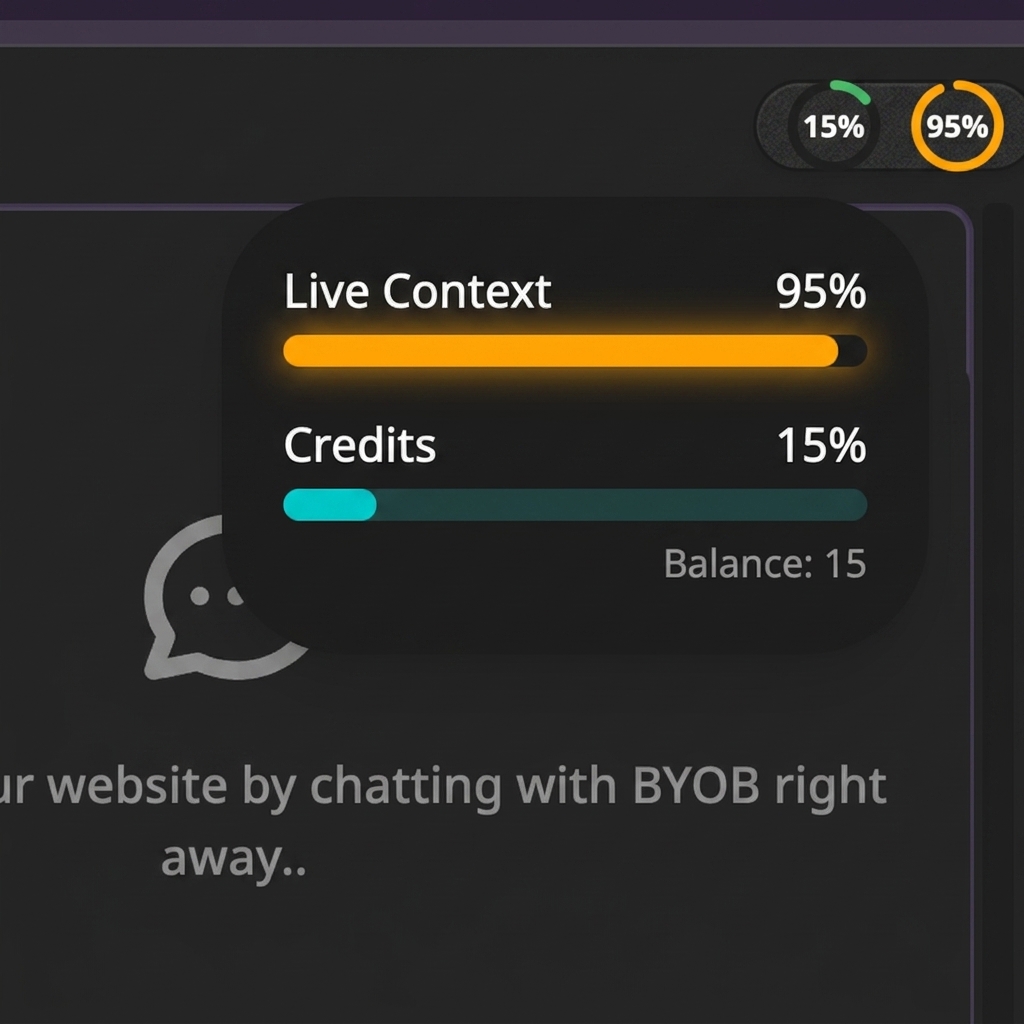
Nothing here is BYOB specific. This is how language models work everywhere. As stated by Anthropic in their context window docs, everything in a request counts toward the window: the system prompt, every message including tool results and images, the tool definitions, and the output being generated. Each turn stacks on the last. Previous turns are preserved completely, which sounds generous until you realize you pay for that generosity twice, once in tokens and once in attention.
Why does drift appear in long threads? #
Anthropic gives this decay a name: context rot. Their docs put it plainly. As token count grows, accuracy and recall degrade. Curating what sits in context matters as much as how much room remains. Their engineering guide on context engineering goes further and frames it as an attention budget. Every token attends to every other token, so a longer thread stretches the model's focus thin. Performance falls off on a gradient, not a cliff. Things get vague before they get wrong.
In a BYOB build thread that vagueness has a shape. Watch for it.
- Style choices from early prompts quietly stop applying
- Constraints you set on turn 4 get forgotten by turn 40
- Edits grow larger and noisier than the request asked for
- You enter a loop of clarifications that burns tokens without shipping
The model is not failing randomly. It is operating under context pressure.
Context threshold strategy #
Use practical thresholds, not perfect ones.
| Context fill | Suggested action |
|---|---|
| Low | Continue normally |
| Medium | Keep prompts tightly scoped |
| High | Save checkpoint and start fresh session |
Threshold values vary by model and workflow complexity, so track your own pattern. This matters because window sizes genuinely differ across models. OpenAI's model catalog lists flagship models with windows above a million tokens next to older reasoning models capped far lower. Same long thread, different breaking point. Observe your actual project instead of memorizing a number.
Resetting context is an optimization move, not a rollback of project state.
How do you keep prompt hygiene to reduce token waste? #
Short prompts are not the goal. Stable prefixes are. Anthropic's prompt caching docs explain that repeated content, system instructions and stable history, can be reused across calls at a fraction of the cost when it stays identical. Every rewrite of your intent breaks that reuse and forces full reprocessing. So write prompts that stay still.
- Ask one clear objective per prompt.
- Avoid contradictory style instructions.
- Reference only relevant files or modules.
- Summarize decisions before changing topic.
- Move unrelated work to new chat sessions.
Fewer reruns means fewer tokens. That is the whole game.
Session design pattern for teams #
Use session boundaries intentionally.
- Session A covers landing page and design system.
- Session B covers auth and user flows.
- Session C covers billing and deployment flow.
Splitting by domain reduces cross-topic pollution. This mirrors what Anthropic recommends for long horizon agent work in their context engineering guide: give each focused task a clean window and let a short summary carry the plan between them, instead of dragging raw history everywhere.
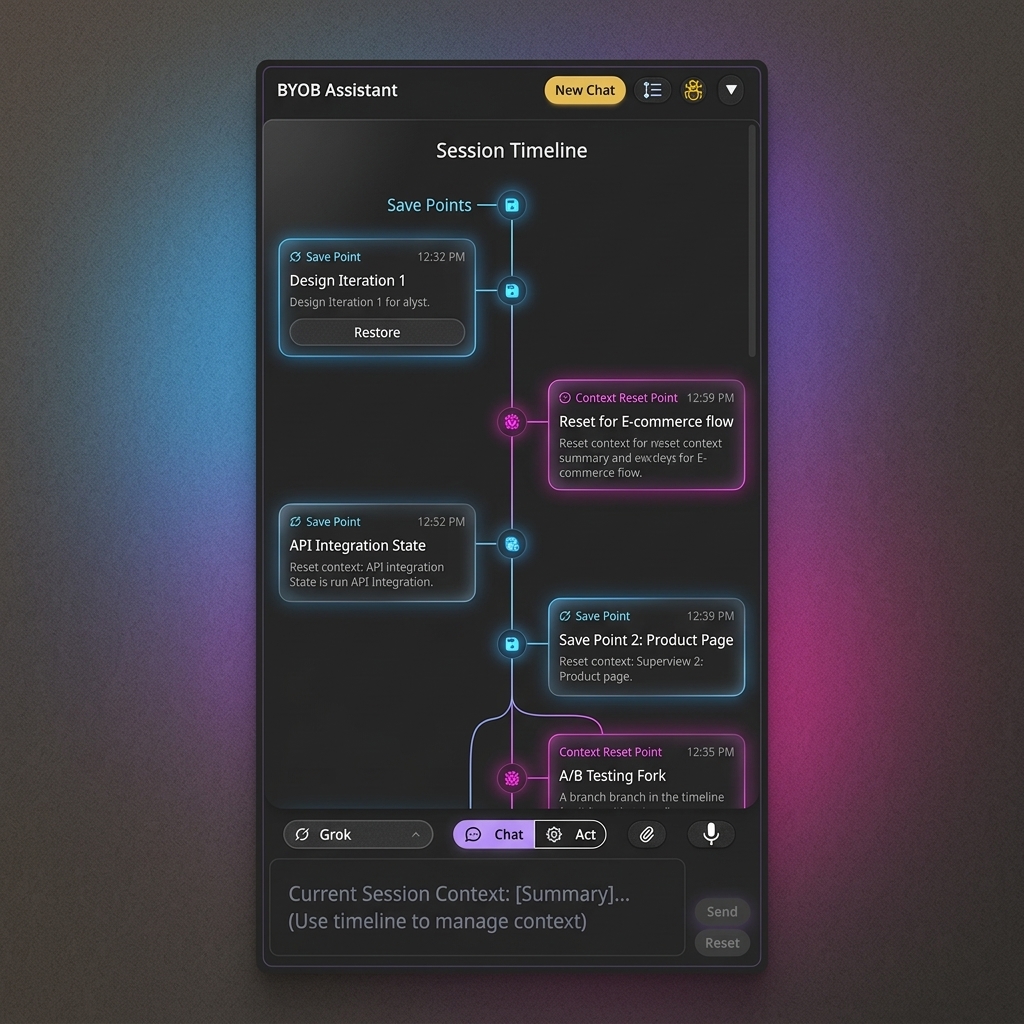
Low-noise handoff format for new sessions #
When you reset context, handoff quality determines continuity quality. Use a stable handoff format.
- what is already complete
- what must not change
- what is next
- acceptance criteria for next step
This avoids repeating long historical context while preserving engineering intent. Four lines beat forty. I have watched teams paste entire transcripts into fresh sessions and recreate the exact swamp they tried to escape. Do not do that.
Common anti-patterns #
Anti-pattern 1: giant prompts with mixed objectives #
One prompt that asks for design, logic, SEO, and deployment changes usually creates noisy output and reruns.
Anti-pattern 2: unresolved contradictions #
Requests like "minimal style" and "dense feature-heavy dashboard" in the same instruction increase ambiguity and token waste.
Anti-pattern 3: no session closure summary #
Without a closure summary, the next session starts with vague memory and leads to rework. BYOB's own homepage puts it simply: if context gets too high, start a new session for cleaner output, as stated on byob.studio. The closure note is what makes that restart cheap.
Practical token efficiency benchmark #
Track your monthly trend with two numbers.
- average prompts per shipped feature
- average reruns per shipped feature
If both are rising, context and prompt structure likely need intervention. If prompts hold steady while reruns climb, suspect fill level. If both climb together, suspect prompt discipline first, because vague asks compound inside long memory.
Context reset runbook #
- Save current snapshot.
- Write one-line summary of completed work.
- Start new session.
- Paste summary and next objective.
- Continue implementation.
This keeps continuity without dragging old noise forward. Snapshots are cheap. Regenerating a lost afternoon is not.
Measuring context quality over time #
Track these indicators in release retros.
- reruns per feature
- average prompt count per successful implementation
- regression count tied to ambiguous prompts
- context resets per sprint
You can then separate prompt issues from genuine model limitations. Most teams blame the model first. The meter usually tells a different story.
What we learned building this #
Chat sessions in BYOB grow with every prompt and reply, so we surface a context fill meter and recommend fresh sessions with a four line handoff, a pattern reflected in the chat panel's session state. Starting a new session keeps snapshots and deploys intact while clearing memory, so quality stays high. We keep the editor preview and snapshot history as the durable side of the handoff.
Who this is for (and who should skip it) #
This guide helps if you run long build chats and want to keep output stable by watching context fill and using fresh sessions well.
If your sessions stay short and scoped to one feature at a time, you will rarely hit drift and can skip the meter.
- Best for developers running long build chats across many turns.
- Best for small teams keeping output steady with clean handoffs.
- Best for freelancers cutting rework on multi day client builds.
FAQ #
Does reset delete my code? #
No. It resets chat context only. Files, snapshots, and deployments stay exactly where they were.
Should I reset every time? #
No. Reset when context is high or output quality drops. Short focused sessions rarely need it.
Is one very long session always bad? #
Not always, but long sessions need tighter prompt discipline. The longer the thread, the more each new prompt must earn its place.
Does context behavior differ by model? #
Yes. Models can degrade differently, so observe actual project behavior. Window sizes, caching behavior, and recall curves all vary by vendor and release.
Use context tracking to keep outputs stable ->
Open your longest chat session today and glance at the fill meter before your next prompt. That one glance is the cheapest performance optimization in the entire product.