
What is BYOB? #
BYOB stands for Build Your Own Buzz, and it represents a different way of building websites. Instead of the traditional approach, where you either learn HTML and CSS or drag elements around in a visual builder, you simply describe what you want in plain English, and the AI builds it for you.
Think of it as a workshop where you describe the furniture and skilled hands build it in front of you. You point, react, and redirect. The sawdust never touches you.
I have watched people who never wrote a line of code build complete, professional looking websites in under an hour. The learning curve is not weeks or months. It runs about 15 minutes of experimenting with prompts. That is the core promise: you focus on what you want, and BYOB figures out how to build it.
Whether you are a complete beginner getting a portfolio online or an experienced developer skipping boilerplate, the experience stays the same: you type, the AI builds, and you refine until it is right.
No coding experience is required. If you can describe what you want in a sentence or two, you can build a website.
Try it: AI Website Prompt Builder — so you can try this on your own site now.
How does the BYOB interface work? #
When you open BYOB for the first time, you see a three panel layout. It might look intimidating if you are used to simpler tools, but each panel has a clear purpose, and you will spend most of your time in just one of them.
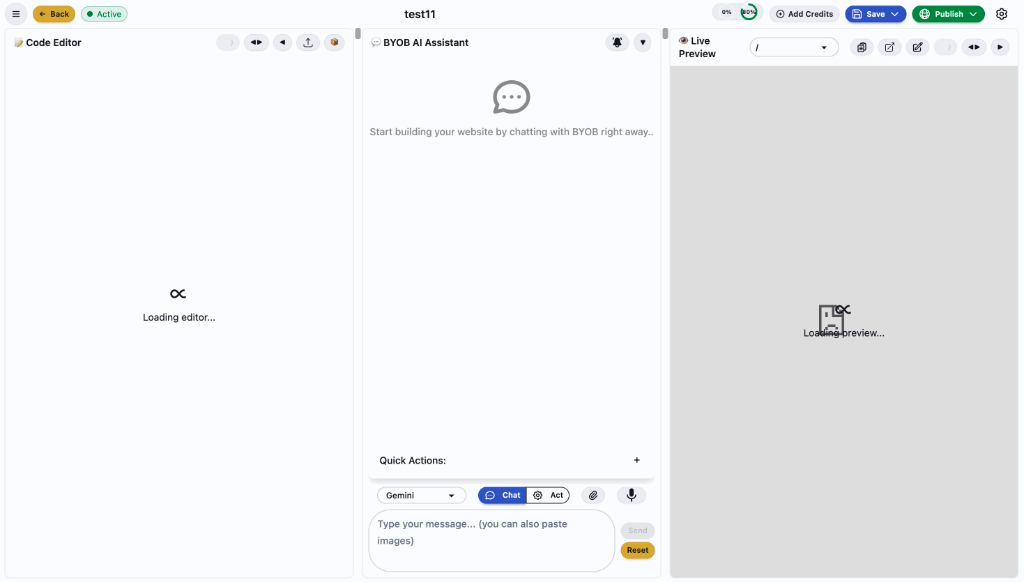
The left panel is the code editor #
This is where the generated code lives. You never have to touch it if you do not want to. Many users never open this panel at all. But if you are comfortable with code and want a quick manual tweak, it waits for you. The code is standard SvelteKit, the framework for building web applications of all sizes documented at its introduction page (https://svelte.dev/docs/kit/introduction), so any developer can understand and modify it.
Manual edits cost no credits. That detail matters. Tiny fixes like a color value or a typo are free when you make them yourself, and they teach you the codebase without risk since every save is versioned.
The center panel is the AI assistant #
This is the heart of BYOB. You type requests here, and the AI responds by generating or modifying your site. Think of it like texting a skilled web developer who responds instantly. You ask for a hero section, and seconds later, there it is.
The right panel is the live preview #
This shows your actual website, updating in real time as changes land. Every time the AI generates new code, you see the result immediately. No waiting for builds, no manual refreshing. If something looks wrong, you tell the AI to fix it in plain words.
How does the AI assistant panel work? #
The AI assistant is where you will spend most of your time, so it deserves a proper tour. At the top sits a model selector with different AI models. Different models carry different strengths. One handles complex layouts better while another runs faster for simple changes. Trying both on your project teaches you more than any comparison table.
Below that sits a toggle between Chat Mode and Act Mode. This distinction matters.
In Chat Mode, you ask the AI questions about your project, about web development in general, or about how to approach a design problem. The AI responds with explanations and suggestions, but it changes nothing in your project. Use this mode to think out loud. Ask why the layout breaks on tablets. Ask which section to cut. Ask what a better headline might promise.
In Act Mode, your messages become instructions. When you type add a contact form at the bottom of the page, the AI does more than tell you how. It writes the code and updates your site. This is where the building happens.
A habit that pays: think in Chat, build in Act. Ask first when unsure. Act when decided. The mode switch costs one click and saves many credits.
How do you create your first project? #
Starting a new project takes about thirty seconds. From the dashboard, click New Project, give it a descriptive name like Coffee Shop Site or Portfolio v2, and you land in the editor with a blank canvas.
The blank canvas can feel paralyzing at first. Here is what I recommend: start with a clear, specific first request. Avoid saying only build me a website. That is too vague for any designer, human or AI. Instead, try something like:
Create a modern landing page for a coffee shop called "Bean & Brew".
I want a warm color palette with earth tones, a hero section with a
full-bleed background image, a menu section showing our signature drinks,
and a contact form at the bottom with our location map.
Within a minute, you hold a complete first draft. Is it perfect. Probably not. But now you have something to react to. You can say make the hero section taller or change the font to something more playful or the menu prices should sit in a grid, not a list. Each refinement takes seconds.
This iterative approach is the key to working effectively with BYOB. Do not try to describe everything perfectly upfront. Get something on the screen, see how it looks, and refine from there. It runs faster and ends better because you decide with something visual in front of you rather than imagining everything in your head.
Voice works here too. If you would rather speak than type, the microphone input transcribes speech through models in the Whisper family documented by OpenAI (https://developers.openai.com/api/docs/guides/speech-to-text), then the assistant interprets the transcript as intent. Describe the section while walking. Review the preview when you sit down.
Watch: adding credits to your account #
See how easy it is to add credits to your account
How do credits work? #
BYOB uses a credit system to manage AI usage, and understanding it helps you work efficiently.
The basic principle: credits get spent when the AI generates or modifies code. Viewing your project, browsing files, or asking questions in Chat Mode uses minimal credits. The heavy lifting, having the AI write new components, refactor your layout, or add functionality, is where credits go.
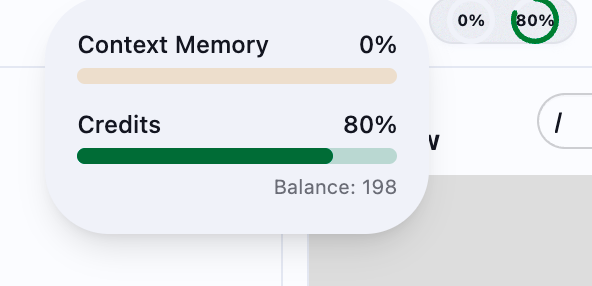
You will see two indicators in the top navigation bar. The first is your credit balance, showing how many credits remain. The second is Context Memory, showing how much of the AI's working memory your current session uses. As chats grow longer and projects grow complex, context memory fills up. When it runs high, the AI may forget earlier conversation parts or make inconsistent choices. Starting a fresh session at that point helps.
Complex requests that generate multiple components or restructure large parts of your site use more credits than simple tweaks. Being specific in your requests helps the AI work more efficiently.
A good habit is batching related requests together. Instead of asking for each menu item separately, describe everything in one go: add a menu grid with Cappuccino at $4.50, Latte at $5, and Espresso at $3.50. This uses fewer credits and produces better results because the AI understands the full context of what you are building.
Tiny changes deserve manual edits. A button color, a typo, a spacing tweak. Open the code panel, change the value, watch the preview update. Free, fast, and oddly satisfying.
How do the referral program and bonus credits work? #
Everyone who signs up for BYOB automatically receives free starter credits to get going.
In addition, BYOB offers a referral program to help you earn even more credits. For every person you refer who creates an account, you receive bonus credits. If a referred person purchases credits, you earn additional bonus credits on top.
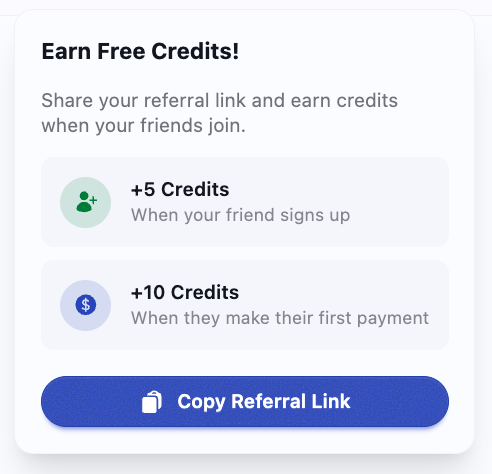
Your bonuses land automatically in your credit balance. Share your unique referral link from the dashboard to invite friends and colleagues. It keeps building affordable without watching the meter anxiously.
Keep track of your referral bonuses on the dashboard. The more people you invite who actively use BYOB, the more credits you earn!
How do you save your work? #
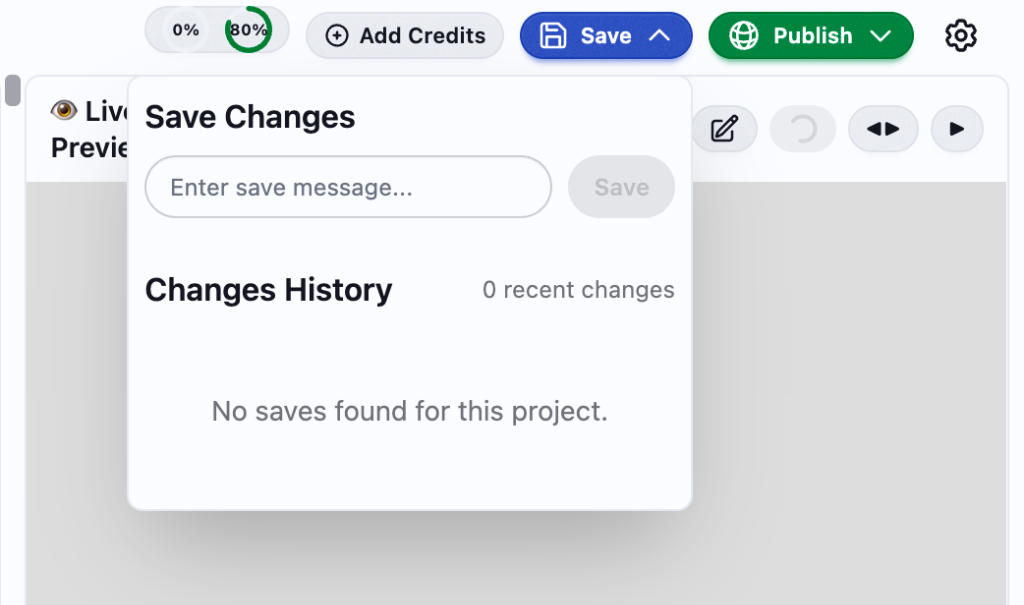
BYOB has a built in version control system that works like the tools professional developers use to track code changes. Every time you save, you create a snapshot of your project that you can return to later.
Watch: saving your project changes #
To save, click the green Save button in the top navigation. You will be prompted for a message describing what changed, something like Added contact form or Fixed mobile navigation. These messages create a history of your project's evolution. If a series of changes looked good individually but broke the overall design, browse your save history and restore any previous state with one click.
Save your work with descriptive commit messages
I recommend saving frequently, especially before big changes. About to restructure your entire layout. Save first. That way, if the restructure fails, you are one click from where you started.
BYOB auto saves periodically, so you will not lose work if you forget manual saves. But explicit saves with descriptive messages make navigating project history far easier later.
Think of save messages like notes for your future self. Fixed stuff means nothing three weeks later. Moved testimonials above pricing section tells you exactly what that version contains.
How do you publish your website? #
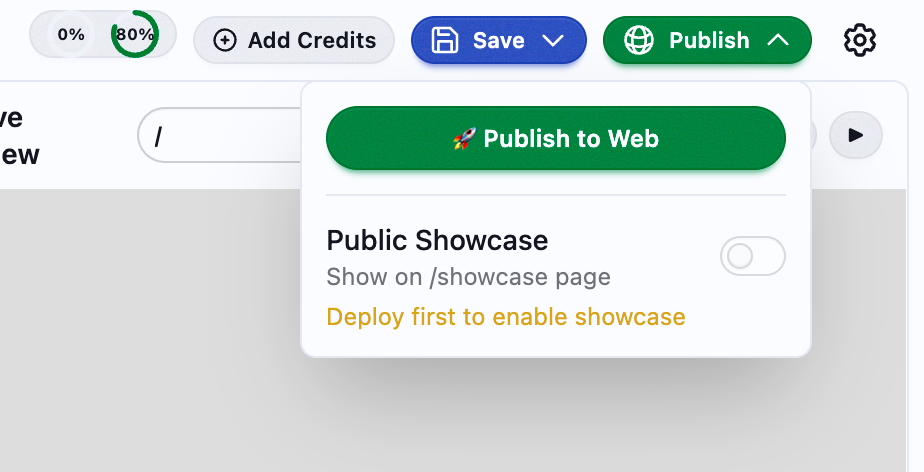
Once your site looks the way you want it, publishing takes seconds. Click the Publish button in the top navigation, select Publish to Web, and BYOB handles the rest: building the production version, optimizing assets, and deploying everything to a global CDN.
Watch: publishing your website live #
When deployment finishes, you get a URL to share immediately. The site is live, served from edge nodes around the world, with SSL already configured. No server to manage, no hosting to set up, no DNS records to configure manually.
Deploy your website to the world in seconds
You also have the option to enable Public Showcase, which features your site on BYOB's showcase page where other users see what is possible with the platform. You need to deploy at least once before enabling this, and it stays entirely optional.
Your published site updates every time you deploy. Make changes in the editor, test them in the preview, and when you are happy, publish again. The URL stays the same; the content updates.
Attach a custom domain as soon as the site represents you publicly. Paid plans unlock domains, and a real domain is the cheapest credibility upgrade available. Share the custom URL everywhere from that point on.
How do you get better results from the AI? #
After working with BYOB for a while, you will notice some prompts work better than others. The AI is smart, but it cannot read minds. It only works with the information you give it. Here are patterns that lead to better results.
Be specific about what you want. Instead of saying make it look better, try change the header background to a blue gradient, increase the font size to 24px, and add a subtle drop shadow. The first instruction forces the AI to guess what better means to you. The second tells it exactly what to do.
Describe the end result, not the implementation. You do not need to say create a flexbox container with justify content space between. Just say arrange these three cards in a row with equal spacing. Let the AI figure out the CSS.
Use comparisons when they help. If you want a particular aesthetic, reference something the AI might know: I want the hero section to feel like a minimal phone maker homepage, lots of white space, big typography. This gives the AI a visual reference to work from.
Break complex requests into steps. If you want a complete store, do not ask for everything at once. Start with the homepage, then add the product grid, then create the product detail page, then build the cart. Each step gives you a chance to refine before moving on.
Here are example prompts for common tasks:
| What you want | What to say |
|---|---|
| A new page | Create an About Us page that tells the story of how our company started, with a timeline of key milestones and a team section with photos and bios |
| Different colors | Update the color scheme to use deep purple as the primary color and gold as the accent, keeping the background light |
| Interactive functionality | Add a contact form that asks for name, email, and message. When submitted, it should show a thank-you message and clear the fields |
| Better mobile experience | Reorganize the homepage for mobile: stack the hero text on top of the image, make the navigation collapsible, and increase button tap targets |
| Animations | Add smooth scroll behavior to all anchor links, and make each section fade in as it enters the viewport |
One more pattern: show as well as tell. Paste a screenshot, reference a site you admire, or describe what feels wrong about the current version. The AI handles visual feedback better than most people expect.
How do suggestions and feedback work? #
We want BYOB to be the best AI powered website builder on the market, and your feedback shapes what we build next. If you have ideas for new features, improvements, or notice any issues, please share them via the feedback form in the dashboard.
You can also reach out to us at hello@byob.studio or support@byob.studio.
Your suggestions help shape upcoming releases and ensure BYOB meets your needs. Thank you for helping us build a better tool!
How does BYOB work under the hood? #
If you are curious about the technology, here is what happens when you interact with BYOB.
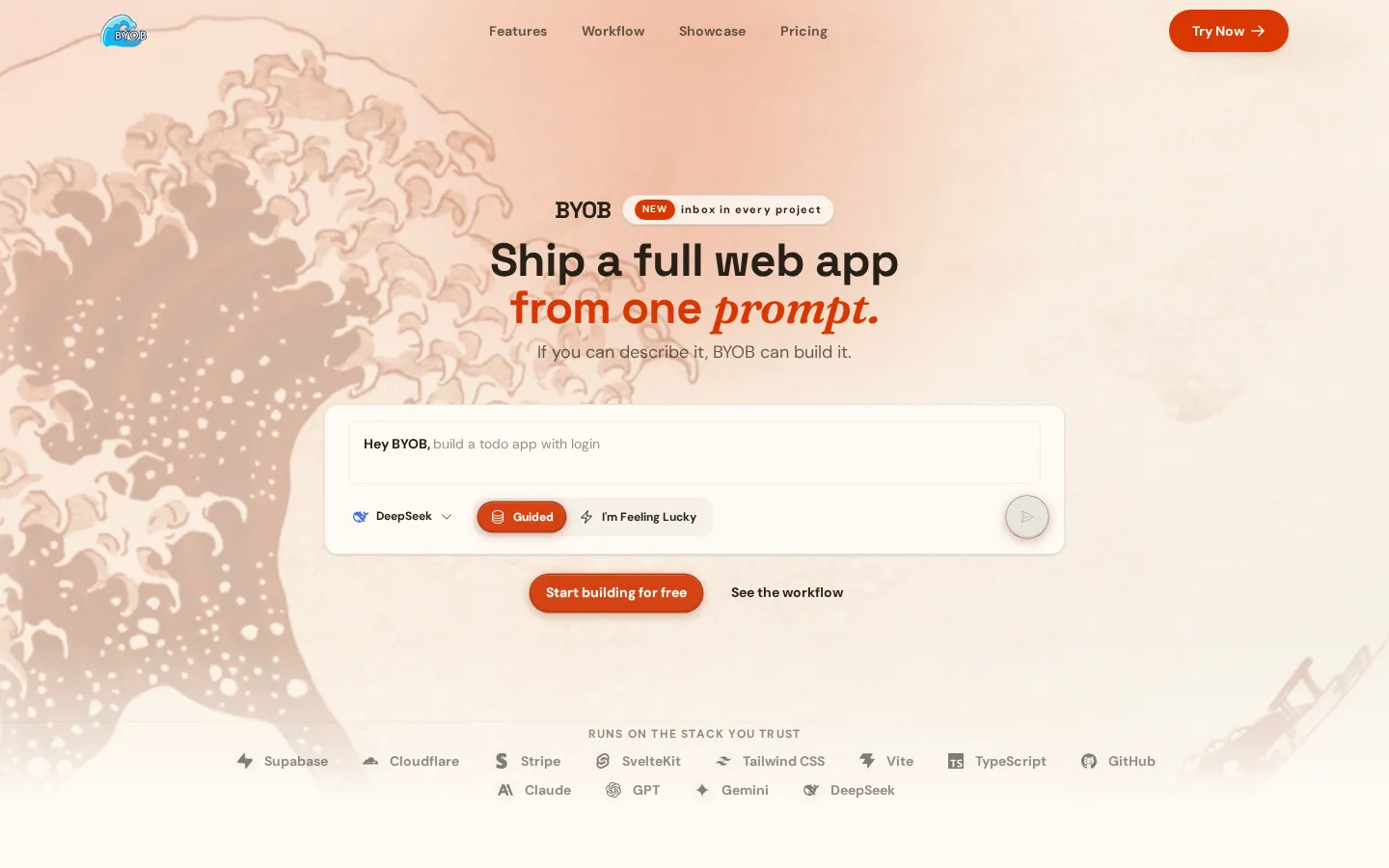
When you type a request, it goes to a large language model trained to understand both natural language and web development. The model parses your intent, generates the appropriate code, and sends it back to the editor. Data loading in the generated app follows the framework's load function patterns documented for SvelteKit (https://svelte.dev/docs/kit/load), and persistence for apps that need accounts and saved records runs on Cloudflare D1 (https://developers.cloudflare.com/d1/).
What makes BYOB different from just asking a chatbot to write code is the integration layer. WebContainer technology runs a complete development environment in your browser. No installations, no local setup needed. The generated code feeds directly into this environment, which builds your project and renders the preview in real time using Hot Module Replacement.
This all happens in seconds. Type a request, see the result. No waiting for deploys, no switching between tools, no copy pasting code from a chat window into an IDE.
How do you troubleshoot common issues? #
Even with a polished product, you will occasionally hit issues. Here is how to handle the most common ones.
If the preview is not loading, start by refreshing the page. If that fails, check your internet connection. BYOB needs a stable connection to run the in browser development environment. As a last resort, try clearing your browser cache. A corrupted cache can sometimes stop the WebContainer from initializing properly.
If the AI is not responding to your requests, first check your credit balance. Without credits, the AI cannot generate new code. If you hold credits but still get no responses, try switching to a different AI model. Occasionally one model has issues while others work fine. Also consider simplifying your request. Extremely complex or ambiguous prompts can confuse the model, and two smaller prompts often succeed where one giant one stalls.
If your changes are not saving, make sure you are logged in. Saving requires authentication. Check your internet connection, as saves sync to the cloud. If both check out and saves still fail, try clicking Save again. Transient network issues can occasionally fail a save silently.
Always save before closing your browser tab. While BYOB auto saves periodically, a manual save ensures you do not lose the last few minutes of work if you close the tab at an unlucky moment.
What can you build with BYOB? #
BYOB is designed primarily for front end web projects: landing pages, marketing sites, portfolios, and simple web applications. Here is what people build:
Personal portfolios for designers, developers, photographers, and other creatives who want a clean way to present their work.
Business landing pages for startups that need to validate an idea, capture emails, or pitch investors without spending weeks on development.
Restaurant and local business sites that need to display menus, hours, locations, and contact information, optimized for local search.
Event pages for conferences, weddings, and launches that need a polished presence for a limited time.
Simple web applications with forms, interactive elements, and basic functionality that can be built through conversation rather than code. Add accounts and a database when the idea proves useful, and the same project grows with you.
The sites BYOB generates are real SvelteKit projects. If you outgrow the platform or want to add complex backend functionality, export the code and continue development in any standard development environment. Start from the main site to explore further (https://byob.studio).
What are the trade-offs? #
Prompt led building compresses weeks into an afternoon. Compression has edges worth knowing before you start.
| Where BYOB wins | Where it strains |
|---|---|
| Plain English to SvelteKit app (https://svelte.dev/docs/kit/introduction) with live preview and one click publish to your domain (https://developers.cloudflare.com/pages/configuration/custom-domains/) | Deep custom back ends, strict branch collaboration, and in house stack mandates fit a hand built repo better |
| Data on D1 (https://developers.cloudflare.com/d1/) and loads via SvelteKit patterns (https://svelte.dev/docs/kit/load) grow with the idea | Voice input (https://developers.openai.com/api/docs/guides/speech-to-text) and chat iteration still need review. The model guesses when the brief waves hands |
| Export keeps the code yours, so commitment stays light (https://byob.studio) | Throwaway experiments learn less per hour than reading the framework docs directly |
Pick the alternative, a manual stack, when day one demands custom architecture or the project must live outside BYOB conventions. For portfolios, business sites, and idea validation, describe, refine, save versions, and publish.
Start building #
If you read this far, you hold everything needed to get started. The best way to learn BYOB is to build something. Pick a project: your portfolio, a landing page for a side project, a site for a friend's small business. Start typing.
The first attempt will not be perfect. Neither will the tenth. But with each request, you will get a better sense of how to communicate with the AI, which prompts produce the best results, and how to iterate toward the design you want.
The gap between having an idea and having a live website has never been smaller. Open the dashboard and close it today.
Who this is for (and who should skip it) #
This fits if you want to turn a plain English brief into a real SvelteKit site with live preview and publish to a custom domain without assembling hosting, database, and auth from scratch. It is a good match for founders, marketers, and small teams who value speed and iteration over fine grained control.
Pick something else if you need deep custom backend work on day one, strict branch based collaboration, or a stack you already run in house. Export is available, but starting with BYOB makes less sense when the project must live outside its conventions from the start.
- Best for beginners building a first portfolio or business site in under an hour.
- Best for freelancers skipping boilerplate while keeping real code they can export.
- Best for developers testing ideas fast with prompt-led projects they can refine and publish.
What we learned building this #
We built BYOB as a real app with a three-panel editor, chat and act modes, and live preview that updates in real time. Project code lives in the workspace panels, with version history that creates named snapshots you can preview, compare, and restore. Publishing compiles your site and ships it to the edge, with custom domain support and deployment status tracked in the project dashboard.